Free for the next 72:00:00. Yours to keep, full license, no trial clock.
One Theory.
One Knob.oneTHNG
Each oneTHNG is a single investigation: one question about how recorded sound gets its character, answered with one macro control, a couple of helpers and no kitchen sink. One thing, done until it is right.
Theory No. 01, Fidelity, is out now. No. 02 lands in November, No. 03 in December.
One Theory. One Knob. oneTHNG™
Watch it move
Theory No. 01 on video. Start with the introduction, then work through the demos without leaving the page. Each Theory takes its turn here as it lands.
Three Theories.
Three months.
One at a time.
Fidelity Theory opens the series in October. The next investigation lands in November, and another in December after that. Each one is its own question, its own experiment, and its own plugin.
oneTHNG™ is a series of small, collectible Modbap plugins built around a single sonic idea.
Each Theory starts with a question, explores a specific sound or system, then distills that complexity into one fast, musical decision. One main control. A few purposeful choices. Enough range to move from subtle character to something completely transformed.
“Every Theory starts with a what-if. Fidelity came from looking at the relationship between resolution and bandwidth in vintage machines. Certain combinations have a character we still respond to, so I started wondering: what if those two things could never be high at the same time? What if one had to rise as the other fell? That constraint started landing on familiar coordinates, but also completely new ones. That experiment became Fidelity Theory.”
One knob. One theory. oneTHNG.
The answers
It is free? What is the catch?
There is none. Fidelity Theory opens as a Modbap anniversary drop, free for 72 hours. You get a full license, not a trial: no clock, no demo dropouts, the complete Factory preset library, and preset saving and loading unlocked. It is yours to keep, and updates stay free the way they do for anything else you own.
How do I start the trial?
Download and install, open it in your DAW, and click START 14-DAY TRIAL on the plugin's License page. The first time you open an unlicensed plugin it takes you there on its own. No account, no key, no signup. Before you start the trial the interface works but the output is silent, which is deliberate. One click and audio comes up immediately.
What happens when the trial ends?
Evaluation runs 21 days in total. Days 1 to 14 are the full processor at full quality with no interruptions. Days 15 to 21 are demo mode: everything still works, but roughly every 30 seconds the output fades out for about a third of a second. After 21 days the output goes silent until you license it. Your projects always reopen with every setting intact.
Is there a separate demo build?
No. You install the same file whether you are evaluating or you own it. When you buy, the plugin you already have becomes the full version. There is nothing to uninstall.
Do I need an iLok or a dongle?
No. There is no iLok, no dongle, no challenge-response and no always-on connection. Your license is a portable .modbaplicense file, not a machine lock: nothing in it identifies a computer, so reinstalling, changing a drive or moving to a new machine needs no re-activation and there is no count to run down. Nothing to buy alongside the plugin, and nothing that can stop working because a server did.
Do I need to be online?
Once, for the single click that starts the trial. The plugin sends its own name and a scrambled one-way ID for your computer, and gets a signed start date back. Everything after that is checked on your own machine.
What is the Hub?
hub.modbap.com is your account at the Modbap customer portal, and it is where everything that is not the plugin itself lives. Register the products you own. Re-download installers and your license file any time from My Products. Raise a support case, which is the only way Modbap does support: there is no support email, because a case keeps your order, your products and the conversation together in one place. Ask Modbap, the assistant built into the Hub, answers from the official Modbap documentation, cites the sources it used, links the relevant manual, and opens a case for you when a question genuinely needs a human. An account is free and takes a moment. You do not need one to download a plugin or to run a trial.
Is this just a bitcrusher?
No. A bitcrusher gives you a bit depth control and leaves sample rate alone, or gives you both and asks you to find the pair yourself. This is one knob carrying both axes at once, and there is no setting on it that leaves either one untouched. It is also not a sample rate reducer with a cutoff knob, not a tape or vinyl plugin, and not the right tool for removing a specific frequency problem. That is an EQ. This is for what the whole thing sounds like it was recorded into.
I turned it all the way down and it still sounds crushed.
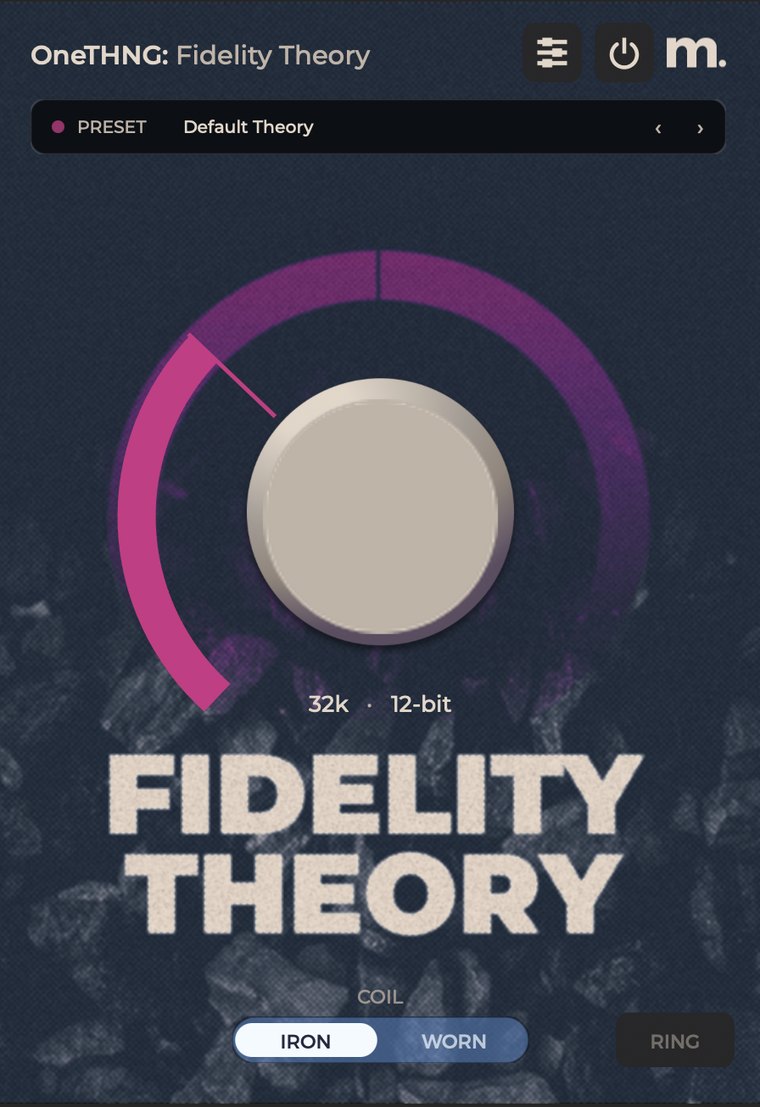
Neither end of the knob is a clean setting. Hard left is 48 kHz at 6-bit: nothing is taken off the top, but the quantization is the coarsest the plugin does. Hard right is 6 kHz at 16-bit: the quantization is fine enough to disappear, but almost no bandwidth survives. Turning the knob down does not move you toward the dry signal, it trades resolution for bandwidth. The untouched signal comes from the power button in the top bar, and that is also what you should use for your A/B.
It sounds metallic and out of tune with the track.
That is RING. What it adds is inharmonic by design and does not follow the key of the material. Switch it off and it is gone completely.
Why does the readout not match my session sample rate?
It is not meant to. The readout names the coordinate the plugin is imposing, the sample rate and bit depth it is degrading to, independent of the rate your DAW runs at. A 96k session and a 44.1k session show the same number at the same knob position. It hides while the plugin is bypassed, because there is no coordinate being imposed.
Something not here? Ask Modbap in the Hub answers from the official documentation and cites its sources, and it opens a case for you if the question needs a human.